Abstract SOL fees so users never hold SOL. The Light SDK sponsors rent-exemption for Solana accounts and keeps accounts active through periodic top-ups paid by the fee payer. Sponsor top-ups and transaction fees by setting your application as the fee payer.
Prerequisite: How Rent Sponsorship with Light Token works
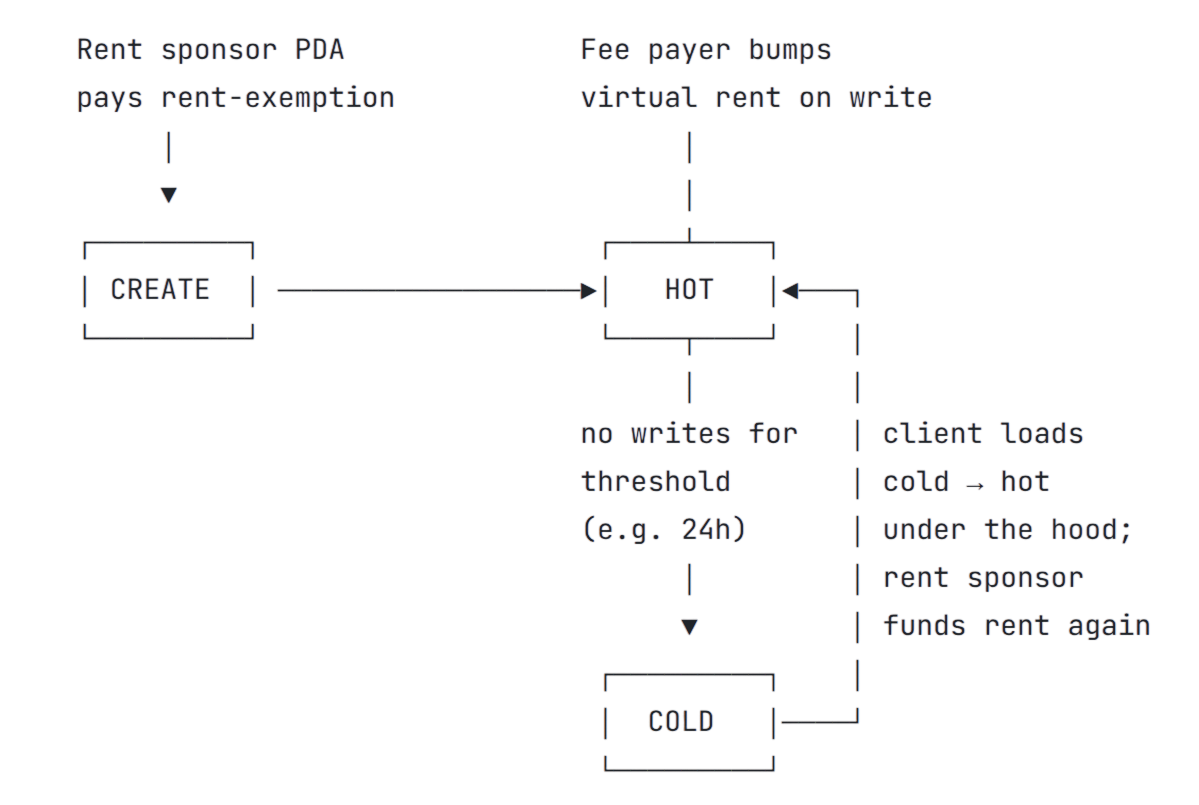
Rent sponsorship is a built-in feature of the Light SDK’s that sponsors rent-exemption.
This is dealt with under the hood in a way that doesn’t disrupt the UX of what your users are used to with SPL-token.Rent-exemption: paid by a rent sponsor PDA.Top-ups: paid by the fee payer.The feePayer on the transaction bumps a small virtual rent balance (766 lamports by default)
on each write to keep the account active (hot balance).
Set your application as the fee payer so users never interact with SOL.Hot-Cold Lifecycle of Accounts.Accounts get auto-compressed (cold balance) when the virtual rent balance goes below a threshold (eg 24h without write bump).
The cold account’s state is cryptographically preserved on the Solana ledger.
Users only interact with hot accounts and load the cold balance in-flight when using the account again.
Solana transactions have a designated fee payer, the account that pays the
network fee. By default, this is the first signer. You can specify a
different account as the fee payer, allowing a third party (the “sponsor”) to
cover fees on behalf of the sender.Light Token extends this: The payer parameter on any Light Token
instruction determines who pays rent top-ups in addition to transaction fees.
Set your application as the payer so users never interact with SOL.In total, your sponsor covers three costs:
Light
SPL / Token 2022
Transfer
~$0.001
~$0.001
Create Token Account
~$0.001 (0.000017 SOL)
~$0.29 (0.0029 SOL)
Transfer + Create Token Account
~$0.001 (0.000017 SOL)
~$0.29 (0.0029 SOL)
Technical Cost Breakdown
Account creation
17,400 lamports
Initial bump on virtual rent balance. Rent-exemption is sponsored.
Rent top-ups
~766 lamports per write
Fee payer bumps the virtual rent balance on each write to keep accounts active. Set payer parameter on any Light Token instruction.
Transaction fees + Priority Fee
5,000 lamports + Priority Fee per tx
Standard Solana fee payer. Set feePayer on the transaction.
Generate or load a keypair for the sponsor who will pay transaction fees and rent top-ups.
The sponsor needs SOL but doesn’t need to hold the tokens being transferred.
import { Keypair } from "@solana/web3.js";import { createRpc } from "@lightprotocol/stateless.js";const rpc = createRpc(RPC_ENDPOINT);// Sponsor: your application serverconst sponsor = Keypair.fromSecretKey(/* your server keypair */);// User: only signs to authorize the transferconst sender = Keypair.fromSecretKey(/* user's keypair */);
2
Create the transfer instruction
Create the transfer instruction with the sponsor as payer and the sender as authority.
The sender owns the tokens and must sign the transfer.
import { createTransferInterfaceInstructions } from "@lightprotocol/compressed-token/unified";const instructions = await createTransferInterfaceInstructions( rpc, sponsor.publicKey, // payer: covers rent top-ups and transaction fees mint, amount, sender.publicKey, // authority: user signs to authorize recipient.publicKey);
3
Send with both signers
Both the sponsor and sender must sign the transaction:
Parameter
What it does
Payer (fee payer)
First positional arg
Signs to authorize payment of rent top-ups and transaction fees. Can be your application server.
Authority (owner)
owner / authority arg
Signs to authorize the token transfer. The account holder.
import { Transaction, sendAndConfirmTransaction } from "@solana/web3.js";for (const ixs of instructions) { const tx = new Transaction().add(...ixs); // Both sponsor and sender must sign await sendAndConfirmTransaction(rpc, tx, [sponsor, sender]);}
Load or generate a keypair for the sponsor. The sponsor needs SOL but doesn’t need to hold the tokens being transferred.
use solana_sdk::{pubkey::Pubkey, signature::Keypair, signer::Signer};// Sponsor: your application serverlet sponsor: Keypair = /* your server keypair */;// User: only signs to authorize the transferlet sender: Keypair = /* user's keypair */;let recipient: Pubkey = /* recipient address */;let mint: Pubkey = /* e.g. USDC mint */;
2
Create the transfer instruction
Build the transfer instruction with the sponsor as payer and the sender as authority.
---description: Gasless transactions for Light Token usersallowed-tools: Bash, Read, Write, Edit, Glob, Grep, WebFetch, AskUserQuestion, Task, TaskCreate, TaskGet, TaskList, TaskUpdate, TaskOutput, mcp__deepwiki, mcp__zkcompression---## Gasless transactions for Light Token usersContext:- Guide: https://zkcompression.com/light-token/wallets/gasless-transactions- Skills and resources index: https://zkcompression.com/skill.md- SPL to Light reference: https://zkcompression.com/api-reference/solana-to-light-comparison- Dedicated skill: https://github.com/Lightprotocol/skills/tree/main/skills/payments- Packages: @lightprotocol/compressed-token, @lightprotocol/stateless.jsHow rent sponsorship works:- A rent sponsor PDA pays the rent-exemption cost on account creation so creators never lock up SOL- The fee payer bumps a small virtual rent balance (766 lamports) on each write to keep the account active (hot)- Set your application as the fee payer so users never pay rent or top-upsKey APIs:| Language | Function | Payer parameter || TypeScript | createLightTokenTransferInstruction() | 5th argument: `sponsor.publicKey` || TypeScript | createAtaInterface() | 2nd argument: `sponsor` (Keypair) || Rust | TransferInterface { ..., payer: sponsor.pubkey() } | `payer` field || Rust | CreateAssociatedTokenAccount::new(sponsor, ...) | 1st argument: sponsor pubkey |### 1. Index project- Grep `feePayer|payer|createTransferInstruction|createLightTokenTransferInstruction|@lightprotocol|@solana/spl-token|Connection` across src/- Glob `**/*.ts` and `**/*.tsx` for project structure- Identify: existing token operations, RPC config, fee payer setup, signing flow- Check package.json for existing @lightprotocol/* dependencies- Task subagent (Grep/Read/WebFetch) if project has multiple packages to scan in parallel### 2. Read references- WebFetch the guide above — review TypeScript and Rust code examples- WebFetch skill.md — check for a dedicated skill and resources matching this task- TaskCreate one todo per phase below to track progress### 3. Clarify intention- AskUserQuestion: what is the goal? (add sponsored top-ups to existing light-token code, new integration from scratch, migrate from user-pays to sponsor-pays)- AskUserQuestion: TypeScript or Rust client?- AskUserQuestion: which operations need sponsoring? (transfers only, ATA creation + transfers, all write operations)- Summarize findings and wait for user confirmation before implementing### 4. Create plan- Based on steps 1–3, draft an implementation plan: which files to modify, what code to add, dependency changes- Key pattern: set the `payer` parameter to the sponsor's public key on transfer and ATA creation instructions- The sponsor Keypair must sign the transaction alongside the user- If anything is unclear or ambiguous, loop back to step 3 (AskUserQuestion)- Present the plan to the user for approval before proceeding### 5. Implement- Add deps if missing: Bash `npm install @lightprotocol/compressed-token @lightprotocol/stateless.js`- Set up RPC: `createRpc(RPC_ENDPOINT)` with a ZK Compression endpoint (Helius, Triton)- Import from `@lightprotocol/compressed-token` for the token APIs- Set sponsor as payer: `createLightTokenTransferInstruction(senderAta, recipientAta, sender.publicKey, amount, sponsor.publicKey)`- Sign with both sponsor and sender: `sendAndConfirmTransaction(rpc, tx, [sponsor, sender])`- Follow the guide and the approved plan- Write/Edit to create or modify files- TaskUpdate to mark each step done### 6. Verify- Bash `tsc --noEmit`- Bash run existing test suite if present- TaskUpdate to mark complete### Tools- mcp__zkcompression__SearchLightProtocol("<query>") for API details- mcp__deepwiki__ask_question("Lightprotocol/light-protocol", "<q>") for architecture- Task subagent with Grep/Read/WebFetch for parallel lookups- TaskList to check remaining work