

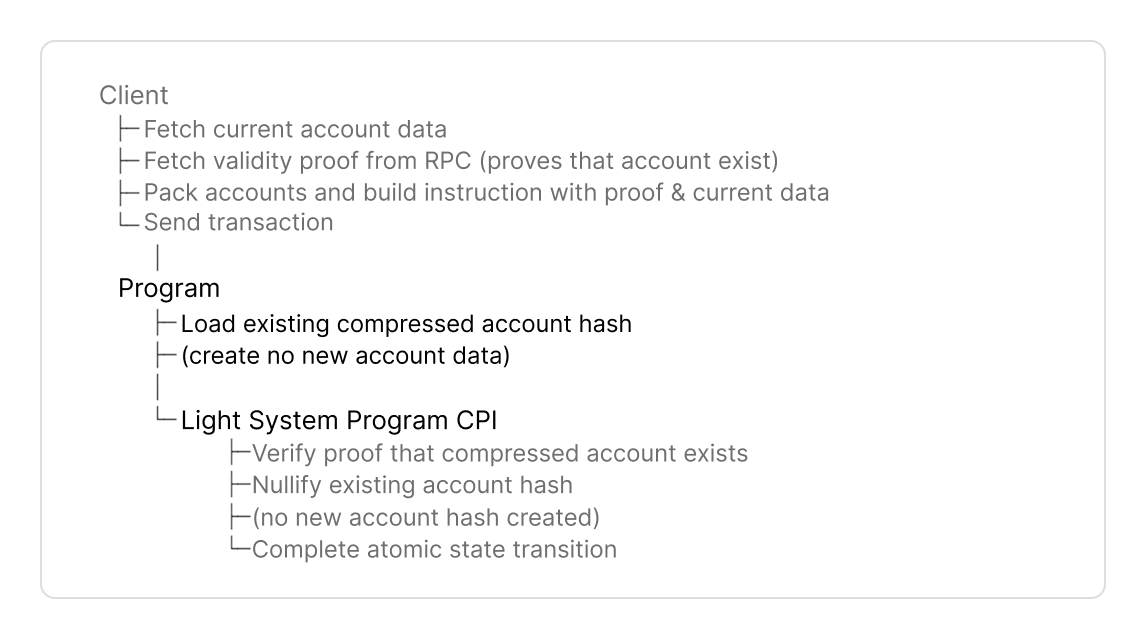
- consumes the existing account hash, and
- produces no output state.
- A burned account cannot be reinitialized.
Find full code examples at the end for Anchor and native Rust.
Implementation Guide
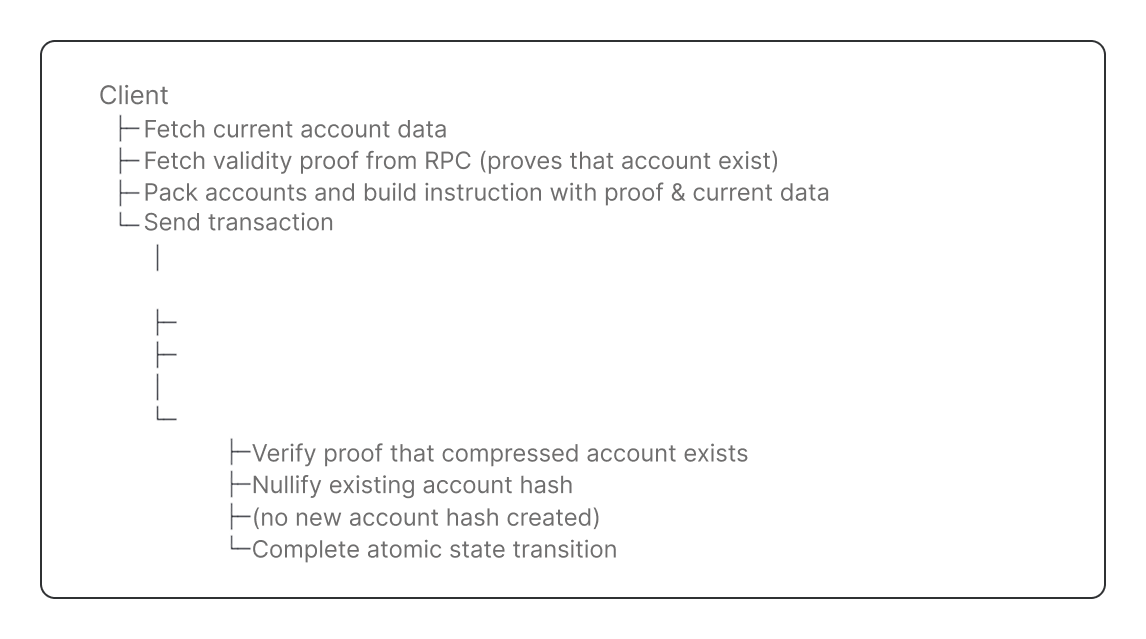
This guide will cover the components of a Solana program that burns compressed accounts.Here is the complete flow to burn compressed accounts:
- Guide
- AI Prompt
1
Program Setup
Dependencies, Constants, Compressed Account
Dependencies, Constants, Compressed Account
DependenciesAdd dependencies to your program.You derive
- The
light-sdkprovides macros, wrappers and CPI interface to create and interact with compressed accounts. - Add the serialization library (
borshfor native Rust, or useAnchorSerialize).
CPISigner is the configuration struct for CPI’s to the Light System Program.- CPIs to the Light System program must be signed with a PDA derived by your program with the seed
b"authority" derive_light_cpi_signer!derives the CPI signer PDA for you at compile time.
- the standard traits (
Clone,Debug,Default), borshorAnchorSerializeto serialize account data, andLightDiscriminatorto implements a unique type ID (8 bytes) to distinguish account types. The default compressed account layout enforces a discriminator in its own field, .
The traits listed above are required for
LightAccount. LightAccount wraps MyCompressedAccount in Step 3 to set the discriminator and create the compressed account’s data.2
Instruction Data
Define the instruction data with the following parameters:- Anchor
- Native Rust
- Validity Proof
- Define
proofto include the proof that the account exists in the state tree. - Clients fetch a validity proof with
getValidityProof()from an RPC provider that supports ZK Compression (Helius, Triton, …).
- Specify input state
- Define
account_meta: CompressedAccountMetaBurnto reference the existing account for the Light System Program to nullify permanently:tree_info: PackedStateTreeInfo: References the existing account hash in the state tree.address: The account’s derived address.
Burn does not specify an output state tree.
CompressedAccountMetaBurn omits output_state_tree_index because no output state is created.- Current account data
- Define fields to include the current account data passed by the client.
- This depends on your program logic. This example includes
current_message(orcurrent_accountin Native Rust).
3
Burn Compressed Account
Burn the compressed account permanently withLightAccount::new_burn(). No account can be reinitialized at this address in the future.new_burn()- hashes the current account data as input state and
- creates no output state to burn the account permanently.
- Anchor
- Native Rust
new_burn():&program_id: The program’s ID that owns the compressed account.&account_meta: TheCompressedAccountMetaBurnfrom instruction data (Step 2) that identifies the existing account for the Light System Program to nullify permanently.- Anchor: Pass
&account_metadirectly - Native Rust: Pass
&instruction_data.account_meta
- Anchor: Pass
- Include the curent account data.
- Anchor: Build
MyCompressedAccountwithownerandmessage. - Native Rust: Pass
instruction_data.current_accountdirectly.
- Anchor: Build
- A
LightAccountwrapper that marks the account as permanently burned with no output state.
new_burn() hashes the input state. The Light System Program verifies the input hash and nullifies it in Step 4.4
Light System Program CPI
The Light System Program CPI burns the compressed account permanently.The Light System Program
- validates the account exists in state tree with the validity,
- nullifies the existing account hash, and
- creates no output state.
- Anchor
- Native Rust
CpiAccounts::new():CpiAccounts::new() parses accounts for the CPI call to Light System Program.Pass these parameters:ctx.accounts.signer.as_ref(): the transaction signerctx.remaining_accounts: Slice with[system_accounts, ...packed_tree_accounts]. The client builds this withPackedAccountsand passes it to the instruction.&LIGHT_CPI_SIGNER: Your program’s CPI signer PDA defined in Constants.
System Accounts List
System Accounts List
| 1 | Verifies validity proofs, compressed account ownership checks, and CPIs the Account Compression Program to update tree accounts. | |
| 2 | CPI Signer |
|
| 3 | Registered Program PDA | Provides access control to the Account Compression Program. |
| 4 | Signs CPI calls from the Light System Program to the Account Compression Program. | |
| 5 |
| |
| 6 | Solana System Program used to transfer lamports. |
new_cpi()initializes the CPI instruction with theproofto prove the account exists in the state tree - defined in the Instruction Data (Step 2).with_light_accountadds theLightAccountwrapper configured to burn the account - defined in Step 3.invoke(light_cpi_accounts)calls the Light System Program withCpiAccounts.
Full Code Example
The example programs below implement all steps from this guide.Setup
Setup
Install Solana CLI:Install Anchor CLI:Install the Light CLI:Verify installation:
- npm
- yarn
- pnpm
- Anchor
- Native Rust
Find the source code here.